01 · Find
Fresh roles, caught early.
Greenhouse, Ashby, SmartRecruiters and five more, watched around the clock. A fit lands in your feed, checked as still open.
ApplyLoop is an AI agent that catches fresh US tech roles minutes after they post, rebuilds your resume for each one, and actually submits.
Applies on
See it running
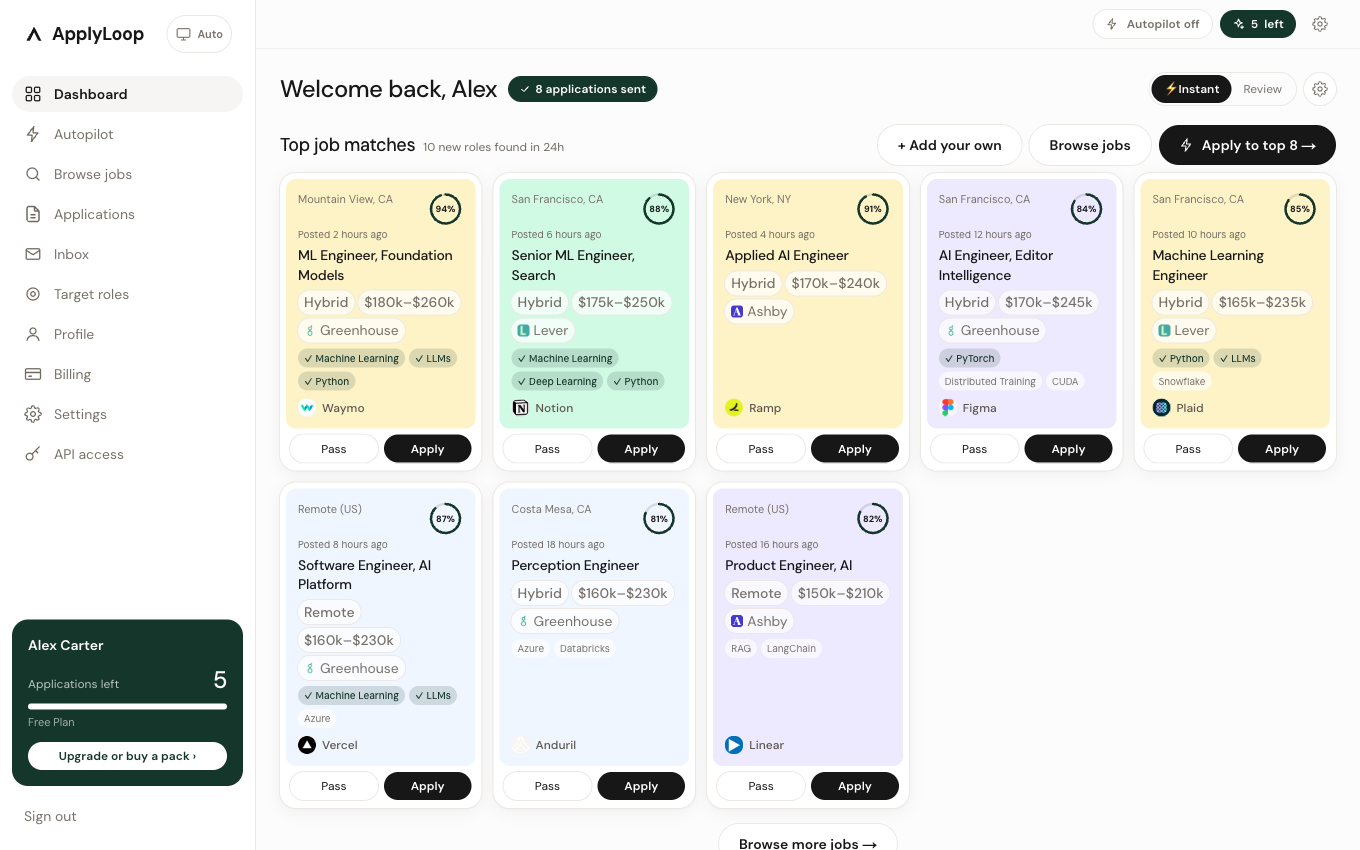
This is the dashboard mid-morning. One Apply click runs start to finish: form filled on the employer's site, submitted, and photographed for your records.
The pipeline.
Greenhouse, Ashby, SmartRecruiters and five more, watched around the clock. A fit lands in your feed, checked as still open.
Your real experience, in the posting's own words. Nothing added, and every change shown to you.
Login, screeners, the upload and the open-ended answers in your voice. Review it first, or let it send.
Recruiter mail is read and matched to the job it belongs to, so the status moves on its own.
Sample data, fictional candidate.
Every application keeps a record: what we filled, the resume we sent, and a screenshot of the employer’s own confirmation page.
Your application for ML Engineer, Foundation Models at Waymo has been received.
You see the tailored resume and cover letter before anything is sent.
The receipt lands in your dashboard the moment the employer confirms.
Set your roles once. It applies to your best new matches every day.
Turn it off any time and no new applications start.
Every tier is the full product. Tiers differ only by volume.
Enough for a real job search.
About 6 cents per application sent
Choose StarterBuilt for a full-time search.
About 5 cents per application sent
Choose ProHit every match before anyone else.
About 5 cents per application sent
Choose PowerSomething else? founders@applyloop.app
No, not unless you turn that on. By default every application waits for your review, and you can read the filled form and the drafted answers before it goes. Autopilot is a setting you switch on yourself, with a daily limit you choose.
Every application keeps a receipt: the fields we filled, the answers we drafted, the resume that went with it, and a screenshot of the employer's own confirmation page captured at the moment it went through. If a run never reached a confirmation page, the receipt says exactly that, the application is not counted as submitted, and you keep the credit.
No. Tailoring rewrites what is already in your profile to match the language of the posting. It never adds a job, a degree, a skill or a number you did not give us, and you can see every change and revert any of it.
You keep the credit. Applications are only counted when one is actually submitted, so a form that will not load, a posting that closed, or a site that blocks automation costs you nothing. The reason is written on the application in plain English.
Yes. Every running application has a Stop button that halts the browser mid-run, and turning Autopilot off stops new ones immediately. Nothing keeps working in the background after you say stop.
Yours. Applications go out under your name, your email and your resume. Where an employer requires an account on their careers site, we create it for you and keep the password in your settings so it is yours to use directly.
No. applyloop.net is a separate product that happens to use the same name, and it is not affiliated with us. ApplyLoop, the agent that tailors your resume for each job and submits the application with a screenshot as proof, is the one at applyloop.pro.
5 free applications. No card required.